

State and state object
Every entityAn entity represents a sensor, actor, or function in Home Assistant. Entities are used to monitor physical properties or to control other entities. An entity is usually part of a device or a service. [Learn more] in Home Assistant has a state. The state tells you what the entity is doing right now, for example, whether a light is on or what the current temperature is. An entity can also have attributes with more details, such as the brightness and color of a light. Home Assistant keeps the state and the attributes together in a state object.
You see states on your dashboards, and you can use them to start automations or to check conditions. To see the state and attributes of all your entities, go to Settings > Tools > States.
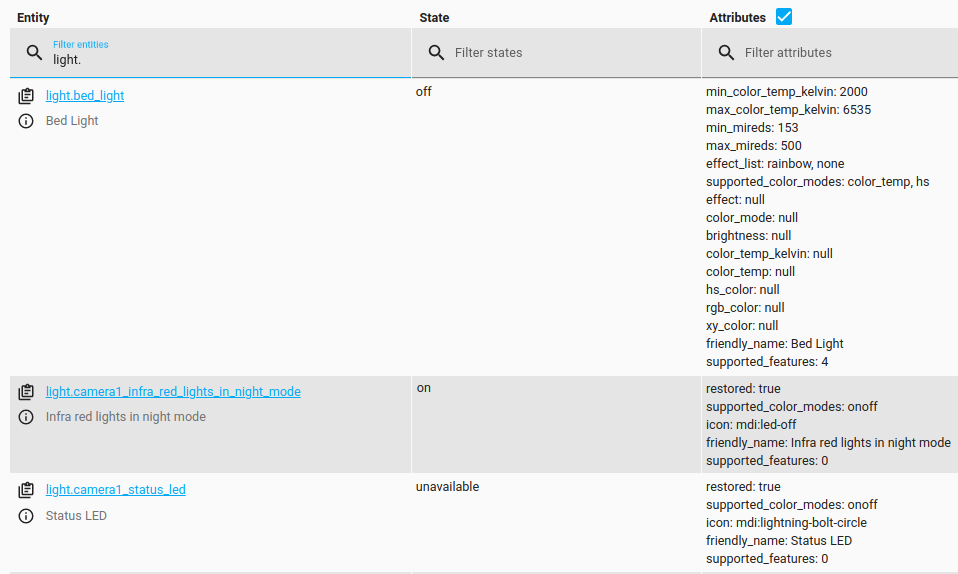 A light in the States tab. Its state is
 on, and its attributes include its brightness and color.
State
The state holds the main piece of information about an entity. For example, on or off for a light, 21.5 for a temperature sensor, or home for a person. Each entity has exactly one state, and the state holds only one value at a time.
Two states have a special meaning:
-
unavailable: The entity cannot provide its state right now. For example, Home Assistant cannot reach the device or service, or the integration of the entity has not been set up. -
unknown: The entity has no value for its state.
Attributes
Attributes hold extra information about an entity. For example, the state of a light is on, and its attributes include its current brightness and color. An entity has only one state, but it can have many attributes.
Some attributes describe the entity itself rather than its current state, such as its name or icon. Each integration adds its own attributes, for example, brightness and color for lights. Which attributes an entity has depends on the integration, and an attribute can be empty (null).
These common attributes may be present, depending on the entity domain:
-
friendly_name: Name of the entity. Example:Kitchen ceiling. -
icon: Icon to use for the entity in the frontend. Example:mdi:home. -
entity_picture: URL to a picture that is shown instead of the domain icon. Example:http://example.com/picture.jpg. -
assumed_state:trueif the current state is an assumption. Only present when this is the case. For more information, refer to classifying the Internet of Things. -
unit_of_measurement: The unit the state is expressed in. Used for grouping graphs or understanding the entity. Example:°C. -
attribution: The provider of the data. Example:Data provided by openSenseMap. -
device_class: The type of device that an entity represents. Used to show device-specific information in the UI. -
supported_features: A number that stands for the features the entity supports. For covers, for example, these features include opening, closing, stopping, and setting a position. For media players, they include play, pause, stop, and volume control. -
restored:trueif the integration of the entity has not set it up, for example, because the integration failed to load or was unloaded. The state is thenunavailable, and the other attributes are taken from the entity registry. Only present when this is the case.
In templates, you can read an attribute by its name, for example, states.light.kitchen.attributes.assumed_state. When an attribute name contains spaces, use the state_attr function: state_attr('sensor.livingroom', 'Battery numeric').
Using states in automations
- To start an automation when the state or an attribute of an entity changes, use the State changed trigger.
- To check the current state before an automation continues, use the State condition.
Behind the scenes, every change to a state or its attributes fires a state_changed event.
State object
The state object is a snapshot of an entity at a specific moment. It holds the state, the attributes, the entity ID, three timestamps, and the context. Other information about the entity, such as its device and area, is not part of the state object. Templates, automations, and the frontend all read the state object.
In this list, state stands for the state object of an entity. In templates, you get the state object with states. followed by the entity ID. For example, states.light.kitchen.state is the state of the light, and states.light.kitchen.attributes are its attributes.
-
state.state: The current state of the entity, as text. Example:off. -
state.entity_id: Entity ID. Format:<domain>.<object_id>. Example:light.kitchen. -
state.domain: Domain of the entity. Example:light. -
state.object_id: Object ID of the entity. Example:kitchen. -
state.name: Name of the entity. This is thefriendly_nameattribute. Example:Kitchen ceiling. If the entity has nofriendly_name, it is the object ID with underscores replaced by spaces. For example,light.kitchen_ceilingbecomeskitchen ceiling. -
state.last_changed: When the state last changed, in UTC. Not updated when only the attributes change. Example:2013-09-17 07:32:51.715874+00:00. -
state.last_updated: When the state or the attributes last changed, in UTC. Not updated when neither the state nor the attributes changed. Example:2013-09-17 07:32:51.715874+00:00. -
state.last_reported: When the entity last reported its state, in UTC. Updated even when neither the state nor the attributes changed. Example:2013-09-17 07:32:51.715874+00:00. -
state.attributes: A dictionary with the attributes of the entity. -
state.context: The context of the state. In templates, you read its fields directly, for example,states.light.kitchen.context.id.
Some entities force an update, for example, MQTT sensors with force update turned on, or some KNX sensors. For these entities, every report counts as a change. last_changed and last_updated are updated, and a state_changed event is fired, even when the state and the attributes are the same as before.
last_reported is only updated when the integration writes the state again. Some integrations, such as MQTT, only write the state when something has changed, unless force update is turned on. For their entities, last_reported does not change when the device sends the same value again. For more information, refer to the last reported state attribute on the MQTT integration page.
Context
The context links states and eventsEvery time something happens in Home Assistant, an event is fired. Different types of events are fired when, for example, an entity’s state changes, an action such as light.turn_on is performed, or Home Assistant starts. All entities produce state change events. Every time the state or the attributes of an entity change, a state change event is produced. Events can be used to trigger automations. For example, you can trigger an automation to turn on a speaker in a room when a light in that room turns on. [Learn more] that belong together. When you or an automationAutomations in Home Assistant allow you to automatically respond to things that happen in and around your home. [Learn more] make something happen, Home Assistant creates a new context. The events and state changes that result from it carry this context. This way, you can tell what caused a change, for example, whether a person or an automation turned on a light.
When an automation is triggered, it gets a new context of its own. The parent_id of this context points to the context of the trigger. To follow a chain of changes through an automation, follow the parent_id rather than comparing only the id.
-
id: Unique identifier for the context. -
user_id: Identifier of the user who started the change.Noneif no user started it, for example, when an automation did. -
parent_id: Identifier of the context that caused this one, if there is one. For example, when an automation is triggered, the context of the trigger becomes its parent.
Examples
These templates read fields from the state object of a switch.
-
The time the state of the switch last changed:
{{ states.switch.my_switch.last_changed }}Result: a datetime, for example,
2025-11-11 12:56:10.244125+00:00. -
The ID of the context of the switch:
{{ states.switch.my_switch.context.id }}Result: a text string, for example,
01K9SF2R36KRV5N4PTC38S6KJ2. -
The ID of the user who last changed the switch:
{{ states.switch.my_switch.context.user_id }}Result: a text string, for example,
e5407786bcf34c84b04e6c02e11391db.Noneif no user changed the switch.