

Conversation
The Conversation integrationIntegrations connect and integrate Home Assistant with your devices, services, and more. [Learn more] allows you to converse with Home Assistant. You can either converse by pressing the microphone in the frontend (supported browsers only (no iOS)) or by calling the conversation.process action with the transcribed text.
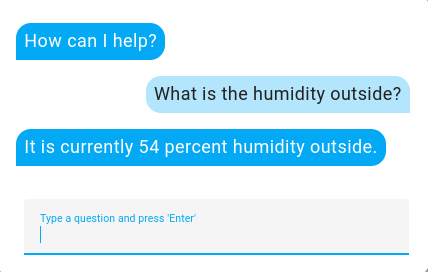 Screenshot of the conversation interface in Home Assistant.
# Example base configuration.yaml entry
conversation:
Default sentences
By default, a collection of community contributed sentences are supported in a growing list of languages.
In English, you can say things like “turn on kitchen lights” or “turn off lights in the bedroom” if you have an area named “bedroom”.
Sentence triggers
To start an automation when Assist matches a sentence that you say or type, use the Sentence trigger. It also explains wildcards and number ranges.
Adding custom sentences
You can add your own sentence templates to teach Home Assistant about new sentences. These sentences can work with the built-in intents or trigger a custom action by defining custom intentsIntent is a term used with voice assistants. The intent is what Home Assistant thinks you want it to do when it extracts a command from your voice or text utterance. [Learn more] with the intent script integration.
To get started, create a custom_sentences/<language> directory in your Home Assistant config directory where <language> is the language code of your language, such as en for English. These YAML files are automatically merged, and may contain intents, lists, or expansion rules.
For an English example, create the file config/custom_sentences/en/temperature.yaml and add:
# Example temperature.yaml entry
language: "en"
intents:
  CustomOutsideHumidity:
    data:
      - sentences:
          - "What is the humidity outside"
To teach Home Assistant how to handle the custom CustomOutsideHumidity intentIntent is a term used with voice assistants. The intent is what Home Assistant thinks you want it to do when it extracts a command from your voice or text utterance. [Learn more], create an intent_script entry in your configuration.yamlThe configuration.yaml file is the main configuration file for Home Assistant. It lists the integrations to be loaded and their specific configurations. In some cases, the configuration needs to be edited manually directly in the configuration.yaml file. Most integrations can be configured in the UI. [Learn more] file:
# Example configuration.yaml entry
intent_script:
  CustomOutsideHumidity:
    speech:
      text: "It is currently {{ states('sensor.outside_humidity') }} percent humidity outside."
More complex actions can be done in intent_script, such as performing actions and firing events.
Extending built-in intents
Extending the built-in intentsIntent is a term used with voice assistants. The intent is what Home Assistant thinks you want it to do when it extracts a command from your voice or text utterance. [Learn more], such as HassTurnOn and HassTurnOff, can be done as well.
For example, create the file config/custom_sentences/en/on_off.yaml and add:
# Example on_off.yaml entry
language: "en"
intents:
  HassTurnOn:
    data:
      - sentences:
          - "engage [the] kitchen lights"
        slots:
          name: "kitchen lights"
  HassTurnOff:
    data:
      - sentences:
          - "disengage [the] kitchen lights"
        slots:
          name: "kitchen lights"
Now when you say “engage the kitchen lights”, it will turn on a light named “kitchen lights”. Saying “disengage kitchen lights” will turn it off.
Let’s generalize this to other entities. The built-in {name} and {area} lists contain the names of your Home Assistant entities and areas.
Adding {name} to config/custom_sentences/en/on_off.yaml:
# Example on_off.yaml entry
language: "en"
intents:
  HassTurnOn:
    data:
      - sentences:
          - "engage [the] {name}"
  HassTurnOff:
    data:
      - sentences:
          - "disengage [the] {name}"
You can now “engage” or “disengage” any entity.
Lastly, let’s add sentences for turning lights on and off in specific areas:
# Example on_off.yaml entry
language: "en"
intents:
  HassTurnOn:
    data:
      - sentences:
          - "engage [the] {name}"
      - sentences:
          - "engage [all] lights in [the] {area}"
        slots:
          name: "all"
          domain: "light"
  HassTurnOff:
    data:
      - sentences:
          - "disengage [the] {name}"
      - sentences:
          - "disengage [all] lights in [the] {area}"
        slots:
          name: "all"
          domain: "light"
It’s now possible to say “engage all lights in the bedroom”, which will turn on every light in the area named “bedroom”.
List of triggers
The Conversation integrationIntegrations connect and integrate Home Assistant with your devices, services, and more. [Learn more] provides the following triggers. Each link below opens a dedicated page with examples, fields, and a step-by-step UI walkthrough.
-
Sentence (
conversation) Triggers when Assist matches a sentence that you say or type.
For an overview of every trigger across all integrations, see the triggers reference.
List of actions
The Conversation integrationIntegrations connect and integrate Home Assistant with your devices, services, and more. [Learn more] provides the following actions. Each link below opens a dedicated page with examples, parameters, and a step-by-step UI walkthrough.
-
Process conversation (
conversation.process) Sends text to a conversation agent for processing. -
Reload conversation agents (
conversation.reload) Reloads the intent configuration of conversation agents.
For an overview of every action across all integrations, see the actions reference.
Conversation automation examples
With the Sentence trigger, you can start an automation by saying or typing a sentence to Assist. Here is an idea to get you started.
You don’t need to edit YAML to use these examples. Copy a YAML snippet from this page, open the visual automation editor in Home Assistant, and press Ctrl+V (or Cmd+V on Mac). Home Assistant automatically converts the pasted YAML into the visual editor format, whether it’s a full automation, a single trigger, a condition, or an action.
Automation: answer whether the garage door is open
When you ask Assist “Is the garage door open?”, this automation answers with the current state of the garage door, for example, “The garage door is closed.”
-
Trigger: Sentence
-
Sentence:
Is the garage door open
-
Sentence:
-
Action: Set conversation response
-
Set conversation response:
The garage door is {{ states('cover.garage_door') }}.
-
Set conversation response:
YAML example for answering whether the garage door is open
alias: "Answer whether the garage door is open"
triggers:
  - trigger: conversation
    command: "Is the garage door open"
actions:
  - set_conversation_response: >
      The garage door is {{ states('cover.garage_door') }}.